Telegram Commands
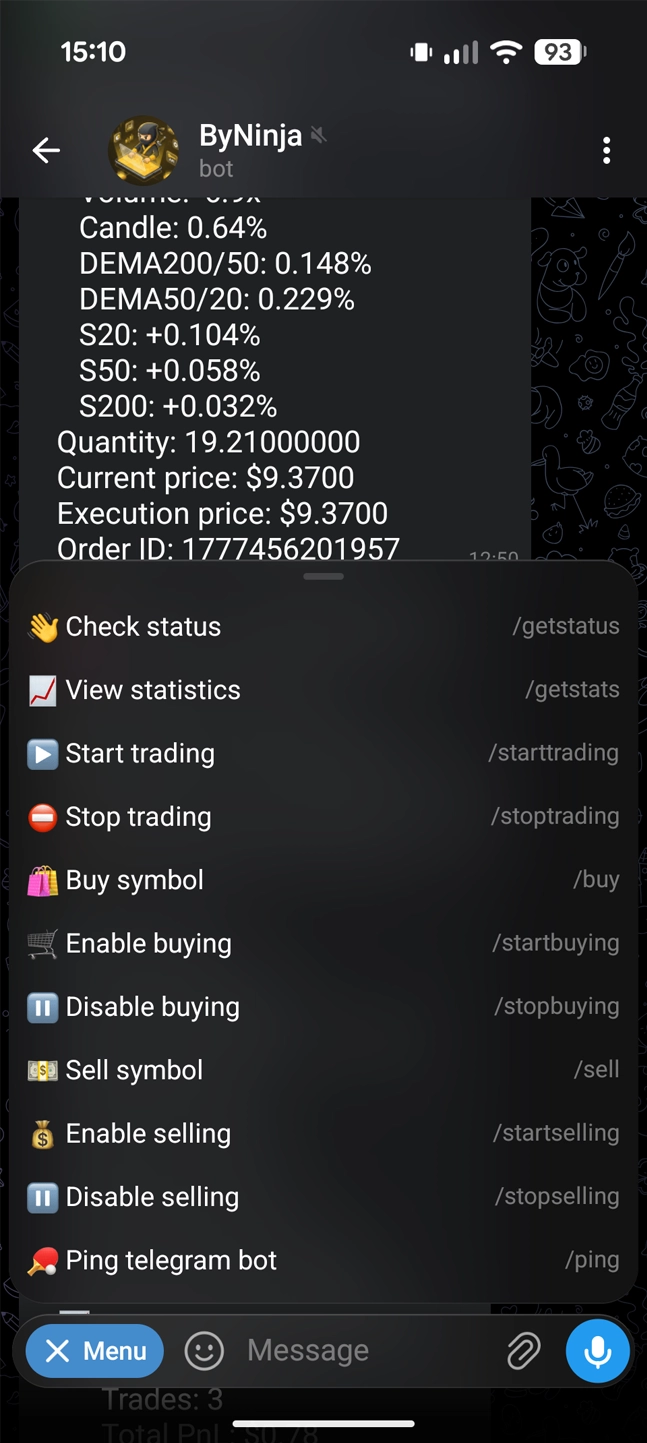
Once the system is fully launched, your Telegram bot becomes your control center. You can manage positions, monitor status, and intervene in the trading process directly from your Telegram chat using intuitive commands.
Core Commands
Essential commands to control the main trading loop.
/starttrading - ▶️ Start Trading
Start the automated trading process.
/stoptrading - ⛔ Stop Trading
Gracefully stop the trading bot. The bot will save all current statistics and status before shutting down.
Position Management
Commands to control the bot's ability to open or close positions for specific pairs.
/startbuying [symbol] - 🛒 Enable buying
Allow the bot to open new positions for the specified symbol.
/stopbuying [symbol] - ⏸️ Disable buying
Prevent the bot from opening new positions for the specified symbol. Existing positions will still be managed.
/startselling [symbol] - 💰 Enable selling
Allow the bot to automatically close positions for the specified symbol.
/stopselling [symbol] - ⏸️ Disable selling
Prevent the bot from automatically closing positions for the specified symbol. You will need to manage the exit manually.
Monitoring Commands
Commands to check the current health and status of your portfolio.
/getstatus - 👋 Check status
Request a detailed status report including account balance, active positions, pending orders, and the trading status of all pairs.
/getstats - 📈 View statistics
View detailed performance statistics, win rate, and total profit/loss.
/ping - 🏓 Ping telegram bot
Check if the Telegram bot is online and responding.
Trading Commands
Direct market execution commands that override the automated strategy.
/buy [symbol] - 🛍️ Buy symbol
Instantly execute a market buy order for a specific symbol or all available symbols, bypassing entry conditions.
/sell [symbol] - 💵 Sell symbol
Immediately execute a market sell order for an active position, closing the trade at the current market price.
Binance Unlock Exclusive Rewards
Get up to 20% Trade Rebates and up to a $100 New User bonus.